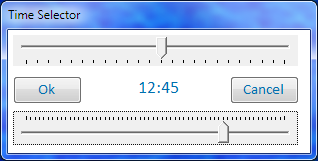
 The Time Selector is the sliding device that appears, to help you, when entering a time value. It ensures that time information is entered consistently e.g. 12:45 [not 12:45:03 nor 12:45 pm nor 12.45 nor 12,45].
Also, it potentially speeds your work, saving you from moving from mouse to keyboard and back to enter time.
From software version v2.0.5 onward, you can set the time in the Time Selector in any of four ways.
- Drag the pointer to the desired Hour or Minute.
- Click the Hour or Minute scale and use the arrow keys (up/down or left/right) to inc/dec time.
- Click the Hour or Minute scale and scroll your mouse wheel to inc/dec time.
- Click the Time and directly type in the desired time. The proper format is hh:mm. Translation will be attempted for anything else.
The arrow keys are handy, but I would still like the option of being able to directly enter the time in the following format: hh:mm.
I find this alot quicker than trying to position sliders.
I’ll add direct entry to v2.0.5 features.