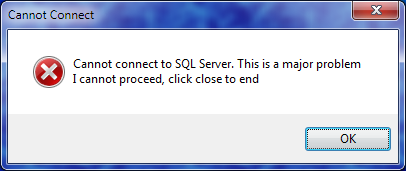
If you see an error message like this after installing the SUD software, it may be because you do not have the correct ODBC Driver software installed. This should be spotted by the installation programme. This can only affect staff when working in Head Office and not when connected to a Remote Desktop Session.
 Depending on the “bitness” of your Windows Operating System, (either 64bit or 32bit) click the relevant link below. The installer will tell you which version you need otherwise you can find out by following these instructions from Microsoft. (Click the picture to follow the link)
Click here to download the 64bit Version.
Click here to download the 32bit Version.
These are Windows Installer packages which should run when clicked after downloading. If not, you may need to re-register the Microsoft Installer program (particularly if you don’t see an associated program icon). To do this follow these steps.
- Click Start, Run and type cmd in the prompt to open a “Command Prompt” window which is a black window with white console style text.
- At the command prompt type
MSIExec /unregister
MSIExec /regserver
each command followed by the enter key. - Close the Command Prompt window; either clicking X or type Exit.